
Everyone can spot AI text now. The "In today's fast-paced world" openers, the triple lists, the sentences that all run the same length. Readers skim past it, clients send it back and editors flag it. This guide shows how to humanize AI text properly: what actually makes copy sound machine-written, the exact prompts that fix it, and how to run the whole thing through the NoTrack API for a few cents per thousand pages. Every example below is real, unedited output.
Why AI Text Still Sounds Like AI
Large language models are trained to be safe, polite and predictable. That is great for a customer service bot and terrible for a blog post. The result is prose that is technically fine and instantly recognizable, because every model reaches for the same moves.
- Stock phrases. "Delve into", "unlock the full potential", "seamless", "game-changer", "it's important to note". Nobody talks like this, and readers have learned to tune out the moment they see it.
- Flat rhythm. Sentence after sentence of roughly the same length and shape. Human writing is bursty: a long, winding thought, then a short one. Like this.
- The rule of three. Benefits come in threes, adjectives come in threes, conclusions come in threes. Once you notice it, you see it everywhere.
- Hedging and filler. Openers that announce what the text is about to do ("In this article, we will explore") instead of just doing it.
- Typographic tells. Long em dashes in every other sentence, perfect title-case headings, tidy summary paragraphs that repeat what you just read.
None of this is about grammar. AI drafts are usually grammatically perfect. They read like AI because they are predictable, and predictability is exactly what both human readers and AI detectors pick up on.
Before and After: Real Output from NoTrack API
Here are three classic AI drafts: a blog intro, a product description and a cold email. Each was sent through the NoTrack API with the humanizer prompt from the next section. The output is shown exactly as the model returned it, not a word changed.
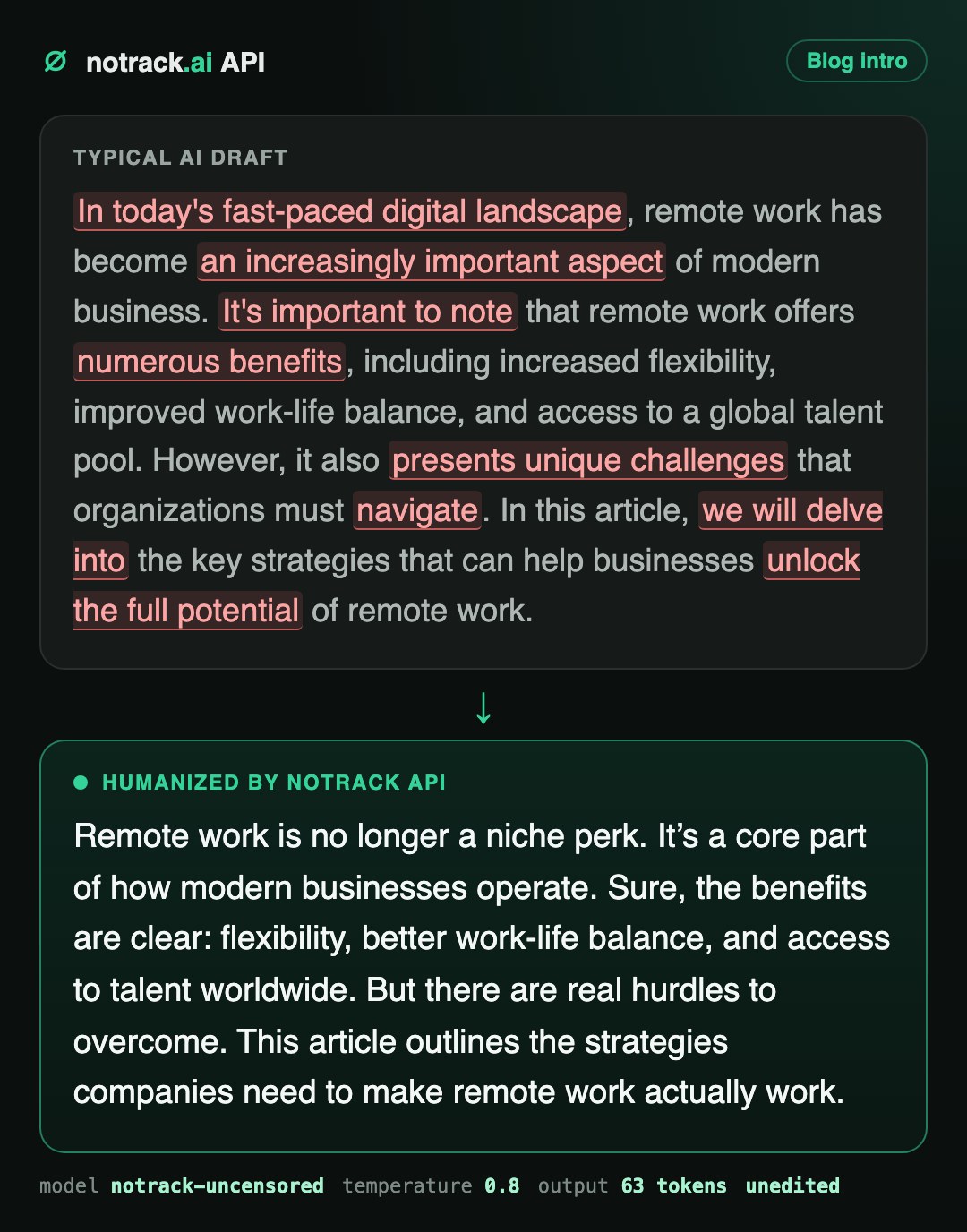
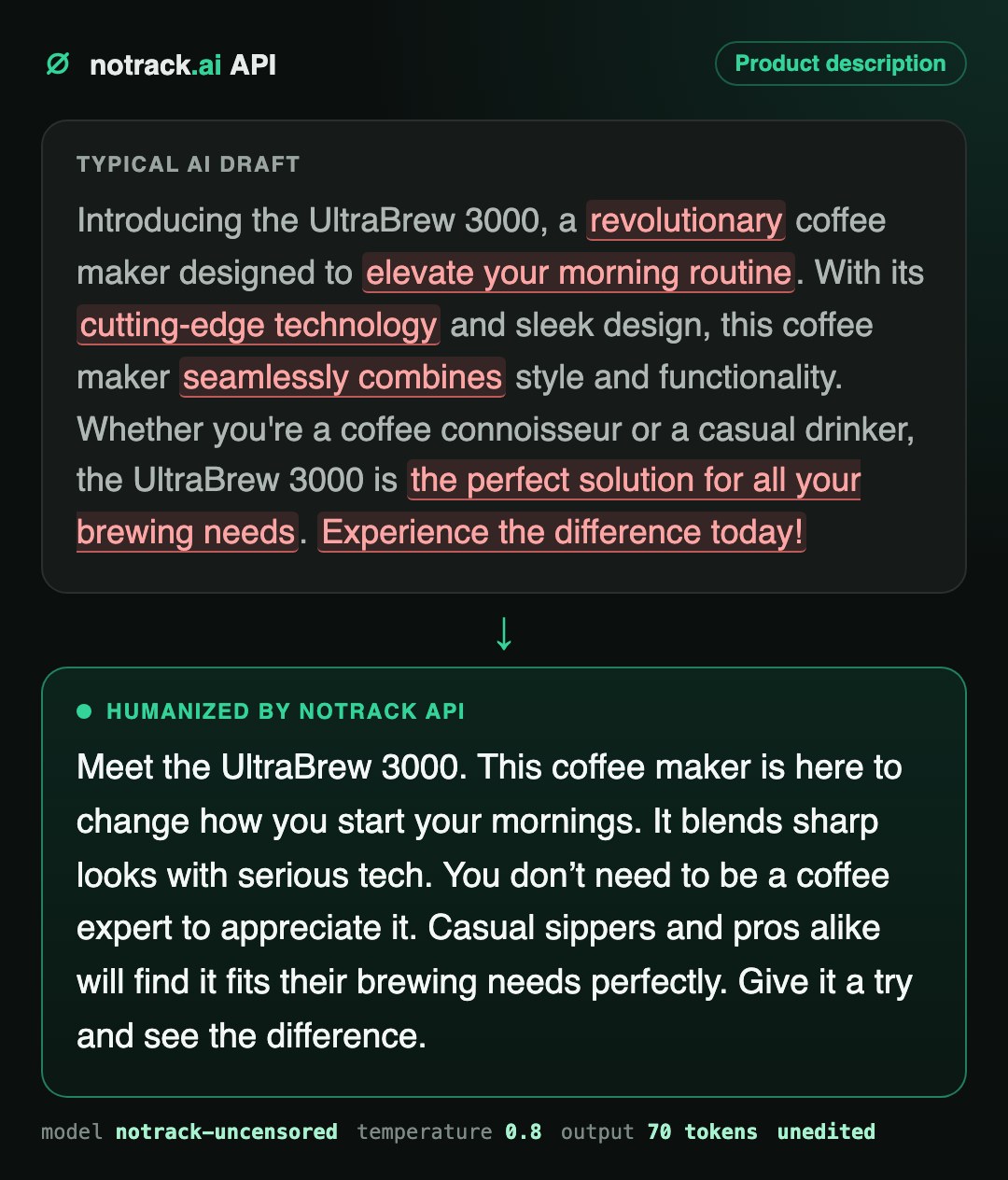
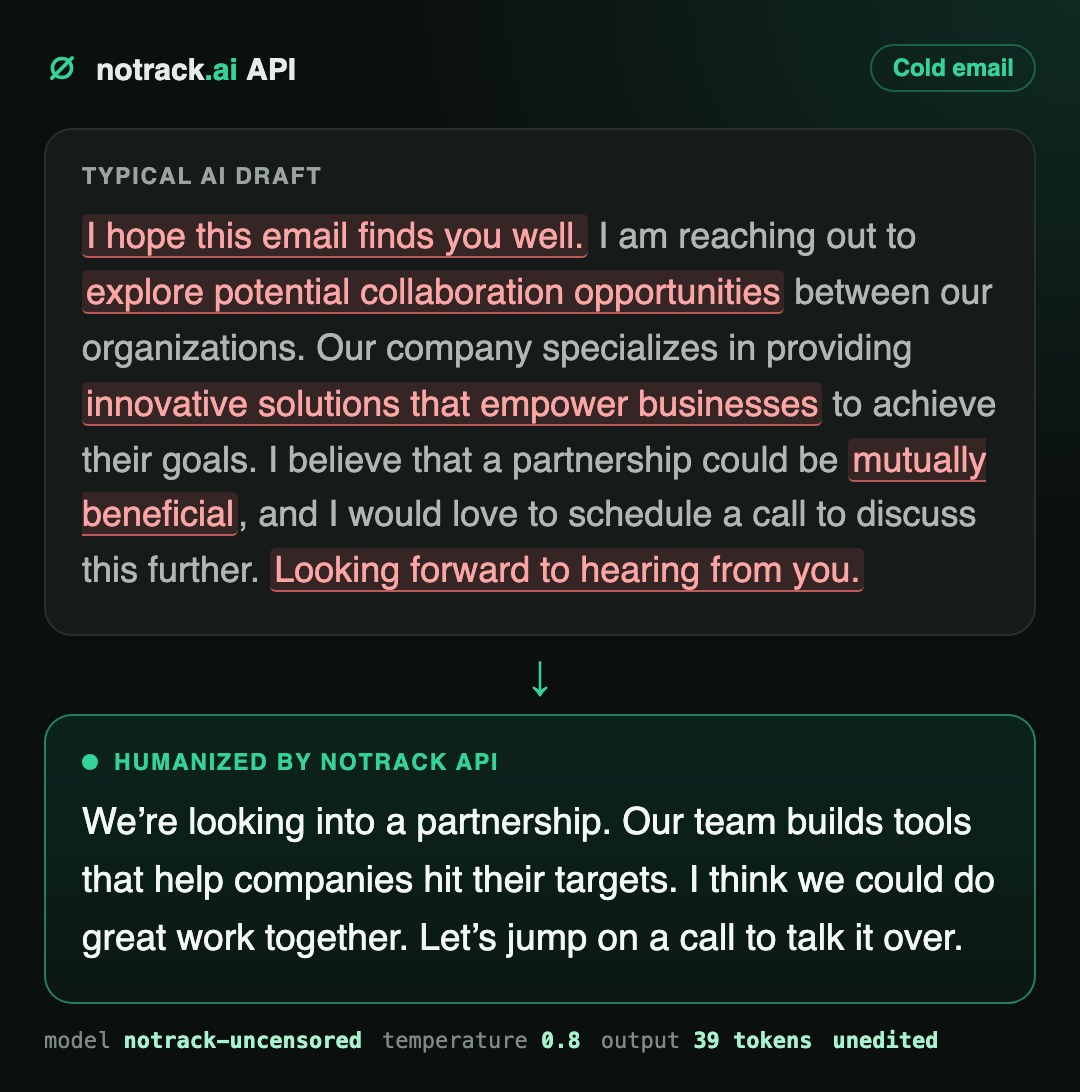
Notice what changed and what did not. Product names, claims and the call to action all survived. What disappeared is the filler, the throat-clearing and the monotone rhythm. That is the whole job of a humanizer.
The Humanizer Prompt (Copy It)
This is the system prompt behind every example on this page. Paste it as the system message and send your AI draft as the user message.
You are a senior editor. Rewrite the text the user sends so it reads like a
skilled human wrote it. Keep every fact, number, name and link exactly.
Vary sentence length: mix short punchy sentences with longer ones.
Use contractions and plain words. Cut filler and stock AI phrases such as
"in today's fast-paced world", "it's important to note", "delve", "unlock",
"seamless", "leverage", "elevate", "game-changer".
No em dashes. Do not add a greeting, a summary or any comment about the
rewrite. Output only the rewritten text.
Every line has a reason:
- "Keep every fact, number, name and link" stops the model from "improving" your content into something inaccurate. Humanizing is a style job, not a rewrite of the facts.
- "Vary sentence length" fixes the flat rhythm, which is the single biggest reason text feels generated.
- The banned-phrase list is short on purpose. Name the worst offenders and the model avoids the whole family. Add your own pet hates.
- "No em dashes" removes the most-memed typographic tell of 2025 and 2026.
- "Output only the rewritten text" means no "Sure! Here's a more natural version:" preamble to strip out in your pipeline.
Five Prompt Recipes for Real Jobs
The base prompt works everywhere. Add one line on top of it and you get a specialist. Every recipe runs on the same model, and two of them are shown in action right below.
SEO blog content
Keep your target keyword intact while everything around it gets rewritten.
- Add: SEO rule: keep the exact phrase "best running shoes for flat feet" and use it exactly once.
- Add a word limit if you are tightening a section.
Brand voice
Describe your brand like you would to a new copywriter. The model follows tone remarkably well.
- Add: Voice: a small independent sneaker shop talking to 20-somethings. Casual, a little cheeky, confident, never cringe.
Sales and outreach email
Short, direct, one ask. The cure for "I hope this email finds you well".
- Add: Maximum 5 sentences. End with one specific question.
E-commerce catalog
Hundreds of product descriptions that all sound like the same robot? Batch them.
- Add: Lead with the one feature a buyer cares about most. No superlatives.
Full rewrite
Same meaning, completely new wording and structure. Useful when a text needs to be genuinely yours.
- Swap the system prompt for: Rewrite the user's text from scratch in your own words, the way a sharp human writer would say it to a friend.
Recipe 1 in action: SEO paragraph
Finding the best running shoes for flat feet can be tough. Your flat arches need real support and stability. This guide breaks down the top market options to help you choose wisely. You will get the right fit and improve your runs. Stop guessing and start running with confidence.
NoTrack API output. Keyword kept exactly once, "daunting task", "delve" and "elevates" removed.
Recipe 2 in action: brand voice
Meet the AirStride Pro. It's not just another shoe. It's built to fix your morning grind. We combined sleek design with tech that actually works. No fluff. Marathon beast or casual jogger? It fits your pace. Grab a pair. Feel the difference.
NoTrack API output from a generic "revolutionary running shoe" description.
Humanize Text via API in Three Minutes
NoTrack API speaks the OpenAI protocol, so any OpenAI SDK, tool or no-code platform works by changing two settings: the base URL and the key.
- Create a key at notrack.ai/api-keys. You get $1 of free credit, enough to humanize several hundred blog posts.
- Set the base URL to
https://api.notrack.ai/v1and the model tonotrack-uncensored. - Send the humanizer prompt as
systemand your draft asuser. That is it.
curl
curl https://api.notrack.ai/v1/chat/completions \
  -H "Authorization: Bearer sk-notrack-..." \
  -H "Content-Type: application/json" \
  -d '{
    "model": "notrack-uncensored",
    "temperature": 0.8,
    "messages": [
      {"role": "system", "content": "You are a senior editor. Rewrite the text ..."},
      {"role": "user", "content": "In today'\''s fast-paced digital landscape, ..."}
    ]
  }'
Python: one text
# pip install openai
from openai import OpenAI

client = OpenAI(base_url="https://api.notrack.ai/v1", api_key="sk-notrack-...")

HUMANIZER = open("humanizer_prompt.txt").read()

def humanize(text: str) -> str:
    r = client.chat.completions.create(
        model="notrack-uncensored",
        temperature=0.8,
        messages=[
            {"role": "system", "content": HUMANIZER},
            {"role": "user", "content": text},
        ],
    )
    return r.choices[0].message.content

print(humanize("In today's fast-paced digital landscape, ..."))
Python: a whole CSV, in parallel
Each key handles 8 requests at once and 300 per minute, so a catalog of 1,000 product descriptions finishes in minutes, not days.
import csv
from concurrent.futures import ThreadPoolExecutor

rows = list(csv.DictReader(open("products.csv")))

with ThreadPoolExecutor(max_workers=8) as pool:
    results = list(pool.map(lambda r: humanize(r["description"]), rows))

for row, new_text in zip(rows, results):
    row["description"] = new_text

with open("products_humanized.csv", "w", newline="") as f:
    w = csv.DictWriter(f, fieldnames=rows[0].keys())
    w.writeheader()
    w.writerows(rows)
Node.js
// npm install openai
import OpenAI from "openai";

const client = new OpenAI({ baseURL: "https://api.notrack.ai/v1", apiKey: "sk-notrack-..." });

const r = await client.chat.completions.create({
  model: "notrack-uncensored",
  temperature: 0.8,
  messages: [
    { role: "system", content: HUMANIZER },
    { role: "user", content: draft },
  ],
});
console.log(r.choices[0].message.content);
Using Make, Zapier, n8n, LangChain or a WordPress AI plugin? Anywhere you can type a custom OpenAI base URL, NoTrack API drops in unchanged. The full reference lives in the API docs.
Settings That Make Text Sound More Human
The prompt does most of the work. These parameters do the rest.
| Parameter | Value | Why |
|---|---|---|
| temperature | 0.8 to 1.0 | More varied word choice. Below 0.6 the rewrite drifts back toward safe, flat phrasing. |
| top_p | 0.95 | Keeps the variety sensible without random word salad. |
| presence_penalty | 0.3 | Nudges the model away from repeating the same words and openers. |
| max_tokens | about 1.5x the input | Room for a full rewrite without cutting the last paragraph. |
| Chunk size | one section per request | A 3,000-word article humanizes better as 5 sections than as one block. |
Why Teams Humanize Through NoTrack API
There are plenty of humanizer websites with a text box and a word counter. An API is a different league: it plugs straight into your CMS, your scripts and your content pipeline, and you pay for tokens instead of monthly word packs.
- It rewrites what other models refuse to touch. Dating, nightlife, adult brands, gambling affiliates, crypto, supplements, true crime. Mainstream models lecture, water down or refuse. NoTrack runs no topic filter, so your copy comes back rewritten, not censored.
- Your drafts are never stored. Prompts and replies are not written to disk, not by the gateway and not by the model servers. We keep a request ID and a token count, because that is the bill. Client work stays client work.
- Clean text, no hidden characters. We scanned 26 NoTrack responses, about 20,000 characters, for zero-width spaces, narrow no-break spaces and other invisible Unicode. The count outside emoji was zero. What you paste is exactly what you see.
- Our own model on our own hardware. Not a reseller wrapper around someone else's API. No third party sees your text, and nobody else's policy change can break your pipeline overnight.
- Pay for what you use. Prepaid credit, no subscription, nothing renews by itself. Refused or failed requests are not billed.
- Works with everything. OpenAI SDKs for Python and Node, curl, LangChain, n8n, Open WebUI, SillyTavern and anything else with a custom base URL. Streaming included.
What it costs to humanize 1,000 blog posts
An 800-word post is roughly 1,100 tokens. With the prompt on top, humanizing it costs about 1,350 input tokens and 1,100 output tokens.
| Volume | Input tokens | Output tokens | Cost on NoTrack API |
|---|---|---|---|
| 1 blog post (800 words) | ~1,350 | ~1,100 | about $0.0014 |
| 100 blog posts | ~135K | ~110K | about $0.14 |
| 1,000 blog posts | ~1.35M | ~1.1M | about $1.44 |
| 10,000 product descriptions (120 words) | ~3.9M | ~1.6M | about $2.58 |
The free $1 credit alone covers roughly 700 humanized blog posts. Subscription humanizer tools sell monthly word packs; here you pay only for the tokens you actually use, and nothing renews by itself.
Who Humanizes AI Text at Scale
Content sites and affiliate blogs
Publish AI-assisted articles that read like an expert wrote them, keep the keywords, lose the robot.
Stores and marketplaces
Rewrite thousands of supplier descriptions into your own voice, so your listings stop looking like everyone else's.
Content and marketing agencies
Deliver drafts that pass client review on the first round. Private by design, so client briefs never leave your control.
Apps with an AI writing feature
Ship a "make it sound human" button inside your own product, powered by an API that will not refuse your users.
Social media and email teams
Turn one AI draft into ten natural variants for tests, channels and audiences.
Writers and editors
Use AI for the first draft and the humanizer for the heavy lifting, then spend your time on ideas instead of rewording.
Humanize, Then Check for Watermarks
Style is only half of the story. In 2026 some AI providers also mark the text they generate, either with invisible characters or with statistical watermarks hidden in word choice. If you publish AI-assisted content, read our companion guide: ChatGPT and Claude watermarks: how to detect and remove them.
FAQ
What does "humanize AI text" mean?
It means rewriting AI-generated text so it reads like a person wrote it: varied rhythm, plain words, no stock phrases, while keeping the meaning and the facts. A good humanizer changes structure and word choice, not just individual synonyms.
Can I humanize ChatGPT or Claude output with NoTrack API?
Yes. Paste any AI draft, from ChatGPT, Claude, Gemini or anything else, as the user message with the humanizer prompt as the system message. NoTrack rewrites it with its own model on its own hardware.
Will humanized text pass AI detectors?
AI detectors score how predictable a text is. The humanizer prompt attacks exactly that: sentence rhythm, stock phrases and word choice. For the strongest result use Recipe 5, a full rewrite, at temperature 0.9, and humanize long articles section by section. Run a sample through the detector your client uses before scaling up.
How much does it cost?
$0.25 per million input tokens and $1.00 per million output tokens, prepaid, no subscription. Your first key comes with $1 of free credit, which covers roughly 700 blog posts of 800 words.
Do you store the texts I send?
No. Prompts and replies are never written to disk by the gateway or the model servers. We record a request ID and token counts for billing, nothing else.
Which languages does it support?
Dozens. You can humanize in German, Spanish, French, Portuguese, Russian, Japanese and many more. Write the system prompt in English and add "Answer in the language of the text", or write it in the target language.
Can I build my own humanizer tool on top of it?
Yes. NoTrack API is OpenAI-compatible, so you can put a humanize button in your own website, app, browser extension or CMS plugin with a few lines of code.